
Hey there, Flutter fans! Buckle up because Flutter 3.35 is here, and it’s all about supercharging your development game. This quarterly release is laser-focused on making your life easier, with standout stars like stable stateful hot reload on the web and the fresh-out-of-the-oven experimental Widget Previews. Thanks to an amazing community effort—1,108 commits from 168 contributors, including 39 newbies—this update is packed with goodies. Let’s dive in and see what’s got everyone excited!
Web Wonders: Hot Reload Goes Mainstream
Picture this: You’re tweaking your web app, hit save, and boom—changes appear instantly without losing your app’s state. That’s the magic of stateful hot reload on the web, now enabled by default in Flutter 3.35! No more fiddling with experimental flags; it’s ready to roll right out of the box, whether you’re running from the command line or your favorite IDE.
We’ve ironed out performance kinks based on your feedback, making hot reload smoother and more reliable across platforms. Sure, you can still disable it with a flag if needed, but we’re planning to phase that out soon. If something feels off in your setup, drop us a bug report—we’re all ears!
Oh, and get ready for the future: Every JavaScript build now does a “dry run” to check WebAssembly (Wasm) compatibility, spitting out warnings if there’s trouble. Toggle it with –wasm-dry-run, and stay ahead of the curve as Wasm becomes the default.
Framework Freshness: Building Better Apps for Everyone
Flutter’s heart is all about inclusivity, and 3.35 cranks up the accessibility dial. We’re talking richer semantics on the web (like supporting user-preferred languages), new widgets like SemanticsLabelBuilder for smarter screen reader announcements, and SliverEnsureSemantics to keep scrollable bits accessible even when they’re off-screen.
Core widgets got some love too: iOS VoiceOver plays nicer, Android TalkBack handles native views better, and RTL languages (shoutout to Persian and Arabic users) now align text selection toolbars perfectly. Custom painters? They’re fully semantics-ready now.
Material and Cupertino: Stylish and Snappy
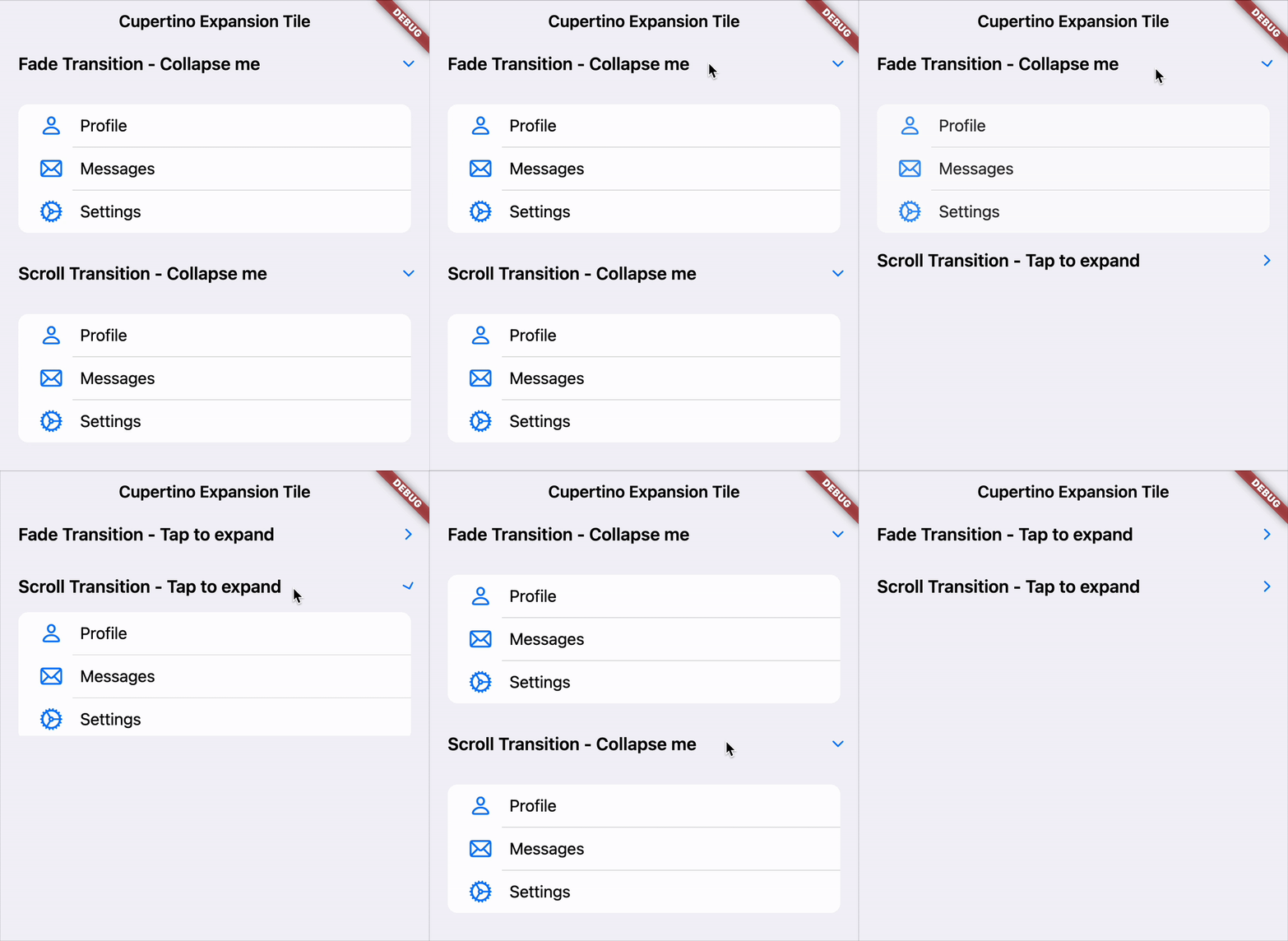
Want more flair? Meet new toys like DropdownMenuFormField for seamless forms, a scrollable NavigationRail, and headers/footers for NavigationDrawer. On the Cupertino side, say hello to CupertinoExpansionTile for collapsible lists, plus that iconic superellipse shape for widgets and haptic feedback on pickers and sliders to make things feel oh-so-native.
Slivers are more powerful with z-order control for fancy effects like overlapping headers. Navigation gets a boost with fullscreen dialog tweaks and form reset callbacks. Text input? Unified gestures, iOS-aligned single-line scrolling, and Android home/end key support make typing a breeze.
Big news: Canonical’s pushing multi-window support forward, starting with Windows and macOS foundations—Linux and APIs are next!
The Road Ahead: Decoupling Design Libraries
Flutter’s growing up, and so are its design libraries. We’re starting to move Material and Cupertino into standalone packages. Why? Faster updates, more community input, and a leaner core framework. No changes for you yet—this is a smooth, long-term shift. Check the vision doc and join the GitHub chat to weigh in!
Platform-Specific Perks
iOS Fans: We’re hustling to support iOS 26 and Xcode 26 betas. Test your apps and report issues—we’ve got a GitHub project tracking it all.
Android Aces: Protect user privacy like a pro with the new SensitiveContent widget. On API 35+, it hides sensitive stuff during screen shares. Dive into the docs for the how-to.
Engine Enhancements: Faster, Smoother, Stronger
The engine’s humming with Impeller upgrades for silky animations: Ditched MSAA on intermediates, nixed lossy compression, fixed mask filters, optimized paths, added Vivante GPU support, and more. App startup? Zippier with threaded init.
Platform fixes abound: iOS gets crash-free WebViews and revived Live Text; Android squashes crashes and shader issues; macOS nails Display P3 colors.
DevTools and IDE Magic: AI and Previews to the Rescue
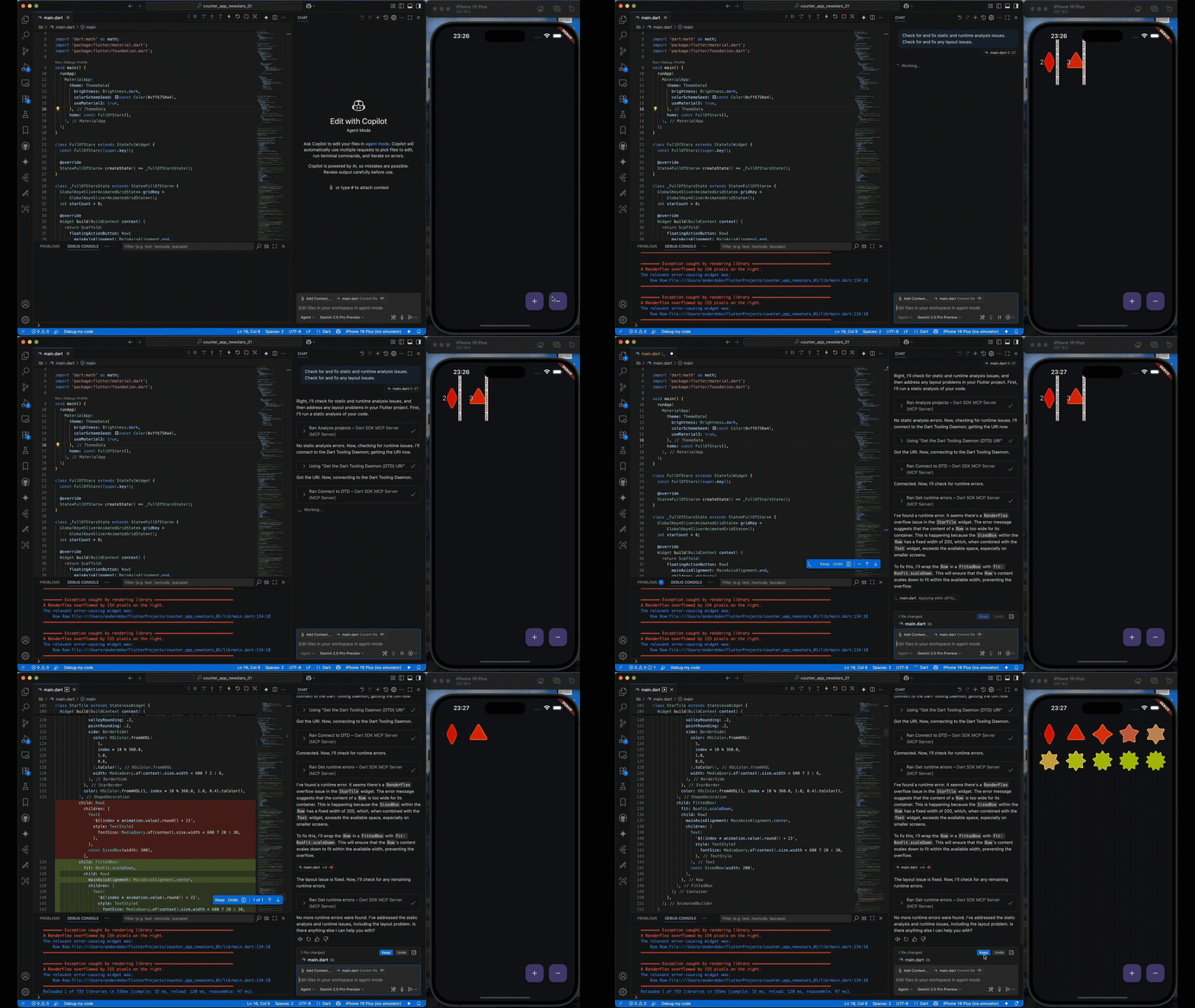
Dart and Flutter MCP Server is stable! This bad boy hooks your AI tools (like Gemini Code Assist) to your project context for epic wins: Auto-fix overflows, snag the perfect pub.dev package, or generate self-correcting code. Read the blog for setup tips—it’s a productivity rocket!
DevTools got UX polish across versions 2.46 to 2.48—check the notes for deets.
Widget Previews? Experimental Awesomeness! Isolate and test widgets in a sandbox: Tweak themes, sizes, and scales side-by-side without running the full app. It’s perfect for design systems. Feedback welcome—future plans include IDE embedding and custom theme support. Docs are live; give it a spin!
Analysis Server’s snappier with AOT compilation, slashing command times (analyze? Up to 50% faster!). IDE plugins now support more JetBrains tools like CLion and PyCharm—thanks to community hero Alex Li!
Widget Previews Land in Flutter 3.35: Design Smarter, Faster!
Flutter developers, your wish has been granted! The highly anticipated Widget Previews feature is here, debuting as an experimental gem in Flutter 3.35’s stable channel. This game-changer lets you test and tweak widgets in a standalone sandbox, and we’re pumped to share it with you!
Flutter’s stateful hot reload already makes iterating a breeze, but Widget Previews takes it up a notch. Imagine isolating a single widget—say, a button or a card—and experimenting with it across different screen sizes, themes, or text scales, all side-by-side, without running your entire app. It’s a dream come true for crafting design systems or fine-tuning UI components with precision.
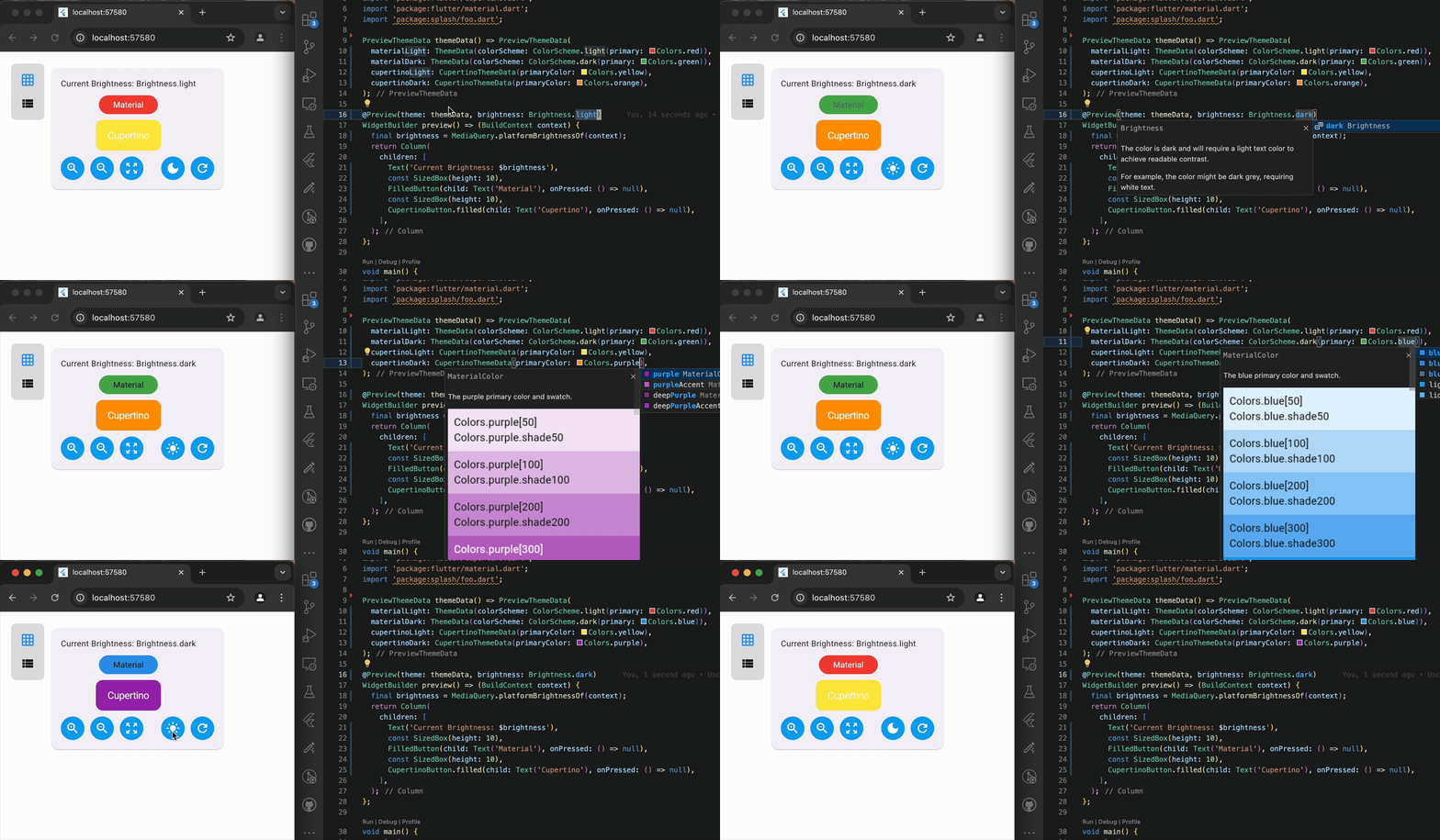
This is an early release, so the APIs and experience are still evolving. Your feedback will shape its future! We’re already planning exciting upgrades like:
- Seamless IDE Integration: Say goodbye to separate browser windows—soon, you’ll get an optional preview pane right inside VS Code, Android Studio, or IntelliJ IDEA.
- Custom Theme Support: As we decouple Material and Cupertino libraries from the core framework, Widget Previews will support your custom design systems like never before.
Heads Up: Breaking Changes and Deprecations
We’re modernizing, so note these:
- Component themes normalized for Material 3 consistency.
- Radio widgets redesigned with RadioGroup for better state management.
- Forms can’t be slivers anymore—wrap ’em in SliverToBoxAdapter.
- Deprecated unused semantics props, renamed Dropdown params.
- Dropping 32-bit x86 Android support (emulators mostly).
- IDEs deprecating old SDKs (pre-3.13 now, pre-3.16 next).
- Min Android SDK: API 24; bump Gradle, AGP, Java as needed.
- No more “pluginClass: none” in pubspec.yaml.
Migration guides are on the breaking changes page—don’t sweat it!
Wrapping Up: Let’s Build Something Amazing
Flutter 3.35 is a love letter to developers, fueled by your ideas and contributions (big props to Canonical and the crew!). From web hot reload to AI smarts and accessibility wins, it’s all about empowering you to create killer apps.
For the nitty-gritty, hit the release notes and changelog. Ready to play? Run flutter upgrade and get coding. What’s your first project? Share in the comments—we’re pumped to see your creations! 🚀